How to make mini book ornaments of your favourite books
A shelf of tiny books, each one a book you loved, hanging on the tree. Here is how to make mini book ornaments with real covers: free printable wraparound labels, the right sizes, and a free 3D printable book with a hook built in.
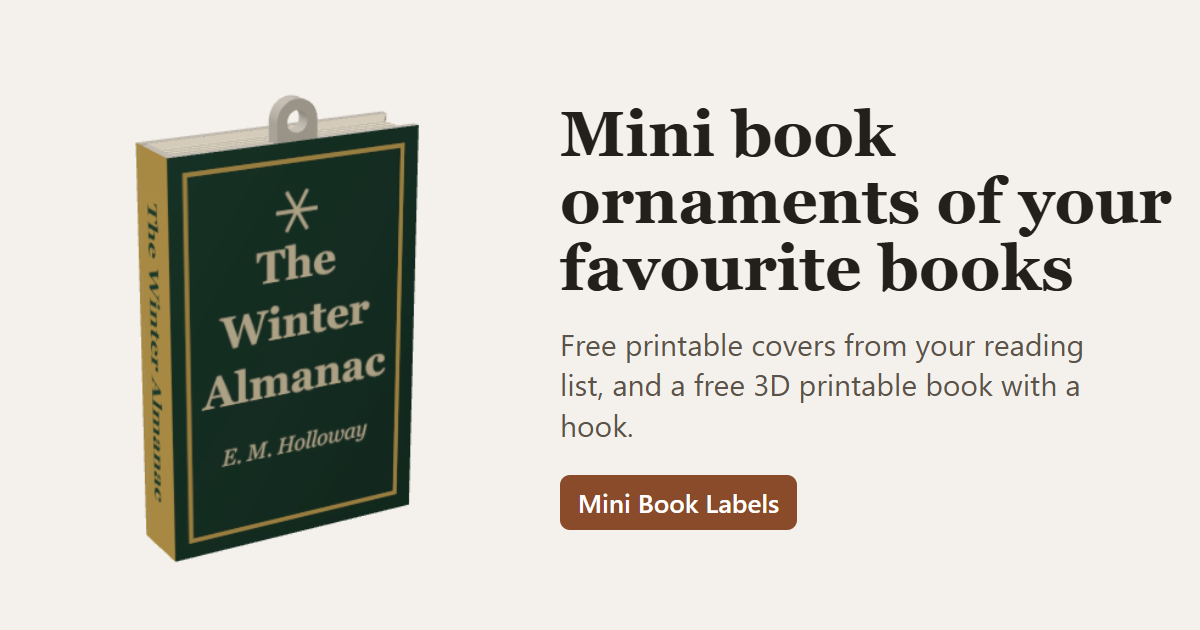
What you need
- Covers: made free in Mini Book Labels from your reading list.
- Paper: full-sheet matte sticker paper, or plain paper and a glue stick.
- Book blocks: 3D printed (free model below), or small wood blocks, foam board or folded card cut to size.
- To hang them: ornament hooks, thin ribbon or thread.
- Tools: a home printer, a craft knife or sharp scissors, and a ruler.
Step by step
-
Choose your books
Export your library from StoryGraph (Manage Account, then Export StoryGraph Library) or Goodreads (My Books, then Import and export), and drop the CSV into Mini Book Labels. The file stays on your device. No export? Search for any book by title, author or ISBN, or try the sample of popular books. Filter by what you have read, your star rating and when you read it, so the year's favourites come first. -
Pick a size
For ornaments, 1:7 (30 x 20 mm) is a good start: readable from a step back and light enough for any branch. Go up to 1:5 for bolder titles, or down to 1:12 if they are for a dollhouse. The table below has every size. -
Check each cover
Covers come from Open Library. Open a book to pick a cover from another edition, or paste in complete wraparound artwork (back, spine and front in one image); the app finds the spine and lines it up, and you can nudge it by hand. Books with no cover get a neat typographic one. -
Print the covers
Print the sheet at 100% scale ("Actual size", not "Fit to page"). Each sheet has a 50 mm ruler: measure it before you cut. A Letter page holds 28 covers at 1:7. -
Make the books
In the app's 3D model section, download a free hardcover book sized exactly to your covers, with an optional ornament hook centred or at either corner. Print it lying on its cover; it needs no supports. No 3D printer? See the options below. -
Wrap and hang
Cut out each cover, then wrap it from the back, over the spine, to the front, pressing it down as you go. Add a hook or loop of ribbon, and hang it.
Mini book sizes
Each scale shrinks a typical 210 x 140 mm paperback with a 35 mm spine. The cover label wraps the back, spine and front, so it is as tall as the book and twice its width plus the spine.
| Scale | Book (height x width x spine) | Inches | Cover label | Per Letter page |
|---|---|---|---|---|
| 1:4 | 52.5 x 35 x 8.8 mm | 2.07 x 1.38 in | 52.5 x 78.8 mm | 8 |
| 1:5 | 42 x 28 x 7 mm | 1.65 x 1.10 in | 42 x 63 mm | 15 |
| 1:6, fashion doll | 35 x 23.3 x 5.8 mm | 1.38 x 0.92 in | 35 x 52.4 mm | 18 |
| 1:7, ornament | 30 x 20 x 5 mm | 1.18 x 0.79 in | 30 x 45 mm | 28 |
| 1:10 | 21 x 14 x 3.5 mm | 0.83 x 0.55 in | 21 x 31.5 mm | 55 |
| 1:12, dollhouse | 17.5 x 11.7 x 2.9 mm | 0.69 x 0.46 in | 17.5 x 26.3 mm | 78 |
| 1:24, half scale | 8.8 x 5.8 x 1.5 mm | 0.35 x 0.23 in | 8.8 x 13.1 mm | 299 |
Any other size works too: set your own height, width and spine in the app.
Making one for the books you read this year? See how to make a year in books ornament: a clear ball of tiny books, a little bookshelf, or your favourites one by one.
No 3D printer? Other ways to make the books
- Wood blocks: craft stores sell small blocks and offcuts; sand one to the book size for your scale. Paint the three page edges cream.
- Foam board: glue layers together until they reach the spine thickness, then cut to height and width with a sharp knife.
- Folded card: fold a strip of card back and forth to the spine thickness and glue it solid. The folds even look like pages.
Tips for 3D printing the books
- Use a smooth build plate. The book prints lying on its front cover, so the plate's surface becomes the cover the label sticks to. A textured plate shows through thin sticker paper.
- Turn on ironing for a flatter top cover, and elephant's foot compensation for clean edges.
- Download 3MF rather than STL where your slicer supports it (Bambu, Orca, Prusa, Elegoo and others do): it keeps the model exact.
- Pick the hook position to suit the tree: centred hangs straight, a corner hook tilts the book a little, like a book on a shelf.
The page edges are modelled as grooves that follow the print layers, so they read as pages when printed, and the book needs no supports at any size.
Questions
What size should mini book ornaments be?
Around 30 x 20 mm (1.2 x 0.8 in) with a 5 mm spine reads well on a tree and is light enough for any branch: 1:7 scale. For a bolder ornament use 1:5 (42 x 28 mm); for dollhouses use 1:12 (17.5 x 11.7 mm).
Can I make them without a 3D printer?
Yes: the covers fit any block cut to the same size. See wood, foam board and card.
What paper should I print the covers on?
Full-sheet matte sticker paper is easiest: it is thin (about 0.1 mm), folds cleanly over the spine and needs no glue. Plain paper and a glue stick work too. Matte hides small bumps better than gloss.
Is it free?
Yes. The label maker and the 3D model are free and run in your browser, and your library file never leaves your device.